Reliable, Affordable Web Hosting Services

Web Hosting by India's Top Listed Web Hosting Company. Our Web Hosting Plans are featured by PHP, ASP.NET3.5, MS SQL Server 2005/2008
Our Web Hosting Plans are featured by PHP, ASP.NET3.5, MS SQL Server 2005/2008

Frequently Asked Question

FAQ / Live Streaming

Broadcasting live stream using Flash Media Encoder


The video from web cameras or television (through TV tuner card) is streamed to the server with high quality by Flash Media Live Encoder which helps to broadcast the below events.
  1. Sporting events
  2. Concerts
  3. Web casts
  4. News
  5. Educational events


Download
Download the plug-in of Flash Media Encoder for live streaming from Version 3.2 for MAC
Usage:
Using Flash Media Encoder for live streaming is easy.


Please follow the below steps and start live streaming.
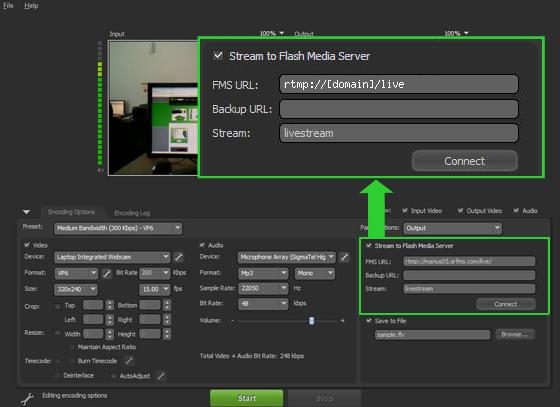
  1. The "FMS URL" field (which is present at the bottom right) will have the protocol RTMP, your account name followed by srfms.com (srfms stands for Server Room Flash Media Server), then slash (/), live and again slash (/). For example if your account name is abc, your FMS URL will be rtmp://abc.srfms.com/live/. This URL will be provided by us to you.
  2. Give the Stream Name in the Stream field. By default, the name is livestream. But you can give any name you wish.
  3. Then click the Connect button.
  4. There will be a prompt for giving your user name and password. Enter both and click ok.
  5. In Encoding Options tab present at left bottom, select your preferences for video like bandwidth, preferred streaming device, format, etc for streaming.
  6. Similarly, select the preferences for audio as well.
  7. The bottom of the page will display the total bit rate (total of video and audio)
  8. Now, the Flash Media Encoder is ready to stream video and audio files.

Related Tags : Live Streaming,
Prev   Next